What Are TikTok LIVE Games? How Gift-Controlled Games Work
· MayaPlay team
Everyone who goes LIVE on TikTok runs into the same question: how do I keep viewers on my stream? Chatting, answering questions, playing games... TikTok LIVE games add something to that: the viewers themselves become part of the game. This guide explains what these games are, how gifts change the game, how chat games work and how to pick the right game for your stream.
What is a TikTok LIVE game?
A TikTok LIVE game runs on the streamer's computer and connects to their TikTok LIVE. The streamer plays or hosts the game, and viewers change it in real time with the things they already do on TikTok: sending gifts, liking, following, sharing the stream and typing in chat.
In an ordinary gaming stream, viewers are an audience. In an interactive game, one viewer's Rose gives your character a shield and another viewer's Galaxy sends you back down the tower. Who sent what is shown on screen, and top gifters are listed. Viewers don't just watch; they change how the stream goes.
The game opens in its own window on the computer, and the streamer adds that window to the stream with TikTok LIVE Studio or OBS. For setup details, see the guide on adding a game to your TikTok LIVE.
How do gifts change the game?
Every MayaPlay game has a gift table made of coin tiers such as 1, 5, 10, 20, 30, 99, 199, 299, 499 and 999. What counts is a gift's coin value, not its name: each gift triggers the highest tier its value reaches, so even a gift that isn't named in the table does something in the game.
Some tiers help the streamer and some troll them. Examples from Troll Tower:
- Rose (1 coin): a shield that blocks the next troll gift.
- Finger Heart (5 coins): wind that pushes the streamer in one direction for 8 seconds.
- Doughnut (30 coins): a 10-second super jump.
- Hand Hearts or Confetti (100 coins): reaches the 99 row and darkens the screen for 12 seconds.
- Sunglasses (199 coins): an elevator that lifts the streamer 10 metres.
- Money Gun (500 coins): a slap that also breaks the shield.
- Galaxy (1,000 coins): sends the streamer back to the previous checkpoint.
The gift menu stays on the game screen, so viewers can see what each coin tier does just by watching, and the streamer doesn't have to explain it. The balance of helpful and troll gifts is what makes it fun: one viewer lifts you up while another pulls you down. For the coin values of all popular gifts, see the TikTok gift values page.
What do likes, follows and shares do?
Viewers who don't send gifts take part too. In Troll Tower every new follower gives a shield, and every 300 likes and every share give the streamer a 10-second super jump; the like bar fills up on screen. Other games have their own effects for follows, likes and shares, listed in the table on each game's page.
That means even someone who just arrived can change the game without spending anything: tapping the screen (a like) already does something.
Games played through chat
In some games viewers mainly play by typing in chat. The commands are short (and in Turkish), and gifts add extra effects. Examples:
- Quiz Show: the streamer hosts and chat competes. Viewers answer by typing A, B, C or D (or 1-4); the fastest correct answer scores most, and after 10 questions there's a champion.
- Vampire Village: viewers who type KATIL (join) become villagers, and one of them is secretly the vampire. Each night someone is bitten, a clue arrives in the morning, then chat votes by typing a number.
- Fortune Wheel: when the wheel stops, viewers type a single letter to reveal the hidden phrase on the board; the first to type the whole phrase solves the puzzle.
Chat games are the easiest way to bring a large audience that doesn't send gifts into the game. You'll find all our chat games under “Chat games” on the TikTok LIVE games page.
Game types: which one fits your stream?
The main types to choose from, depending on your stream's pace and audience:
- Parkour and climbing: Troll Tower, Climb!, Mega Parkour. The streamer plays; viewers help or troll. Great for long streams and the “will they make it to the top?” tension.
- Survival and horror: House of Horrors, Lava Rising. Jumpscares and escapes, for streamers who love live reactions.
- Races: Marble Race, Horse Race. Viewers are part of the race; short, repeating rounds.
- Chat and party games: Quiz Show, Vampire Village, Russian Roulette, Fortune Wheel. The streamer hosts, viewers play through chat.
- Streamer editions: custom editions such as Candy Realm+ with WIN counters and ±block gifts; levels are set inside the game.
Not sure yet? Watch the trailers and check the gift tables on the game pages; they show best which one fits your stream.
What it adds to your stream
An interactive game adds three things to a stream. First, viewers have something to do: whether they send a gift or just tap like, they see the result on screen right away. Second, the stream gets its own story: a Galaxy a few metres from the top or a last-second shield creates moments chat keeps talking about. Third, the streamer doesn't have to keep finding new topics; the game's flow carries the stream.
The result still depends on the streamer, the audience and how well the game fits the stream; no game guarantees viewers or gifts on its own. It works best when the streamer owns the game and talks with their viewers.
How to get started
Once you've picked a game, press “Send a purchase request” on its page and enter your name and number; we call you or message you on WhatsApp. Once payment is agreed, you get your license key and game package. You open the game on your Windows computer in one click, type your TikTok username and add it to your stream with window capture.
For step-by-step setup, see the guide on adding a game to your TikTok LIVE; for all games, see the TikTok LIVE games page.
Games in this guide
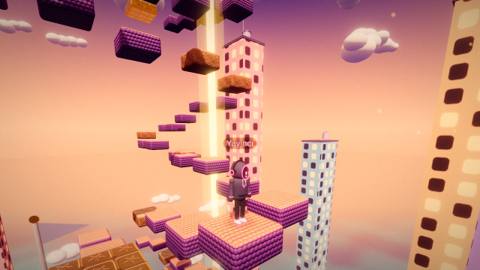 Troll TowerA 3D parkour tower shaped by your viewers' gifts. Shields, elevators, wind, ice rinks, slaps: every gift changes the…
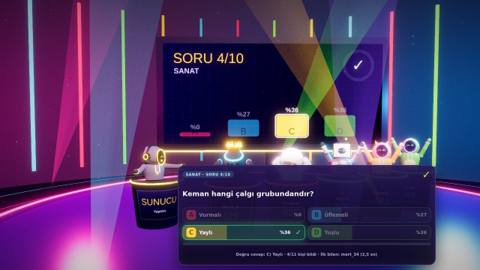 Quiz ShowYou're the host. In a glittering TV studio you read out the questions, and viewers type A, B, C or D in chat. The…
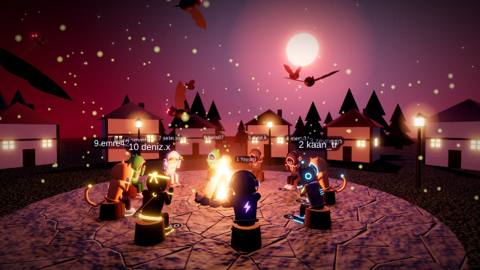 Vampire VillageViewers who type JOIN in chat gather around the fire in the village square at night. One of them secretly becomes the…
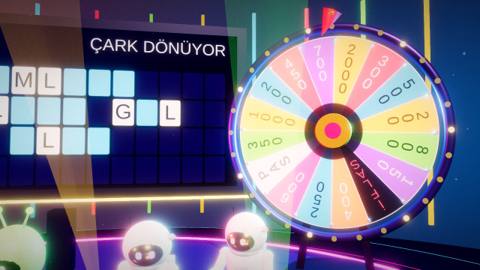 Fortune WheelThe giant wheel spins while a proverb, saying or place hides on the board. When the wheel stops, viewers type a single…
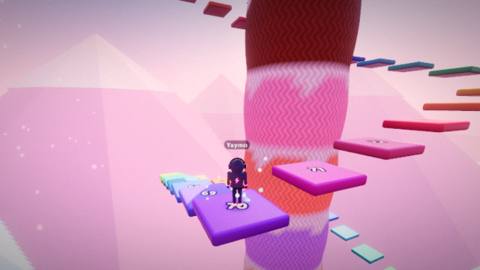 Candy Realm+Numbered, colorful blocks around the cake tower, just like in Roblox: from 50 up to 5,000 steps. Gifts teleport you…